Hyper-Realistic AI Portrait
How to Create a Hyper-Realistic AI Portrait: Turn a Single Photo into a Cinematic Masterpiece with the Right Prompt
AI image generation has become so advanced that even a simple portrait can be transformed into a Hollywood-style cinematic masterpiece. If you have a clear photo of a person and want to convert it into a hyper-realistic, ultra-detailed, cinematic portrait, all you need is a well-crafted AI prompt.
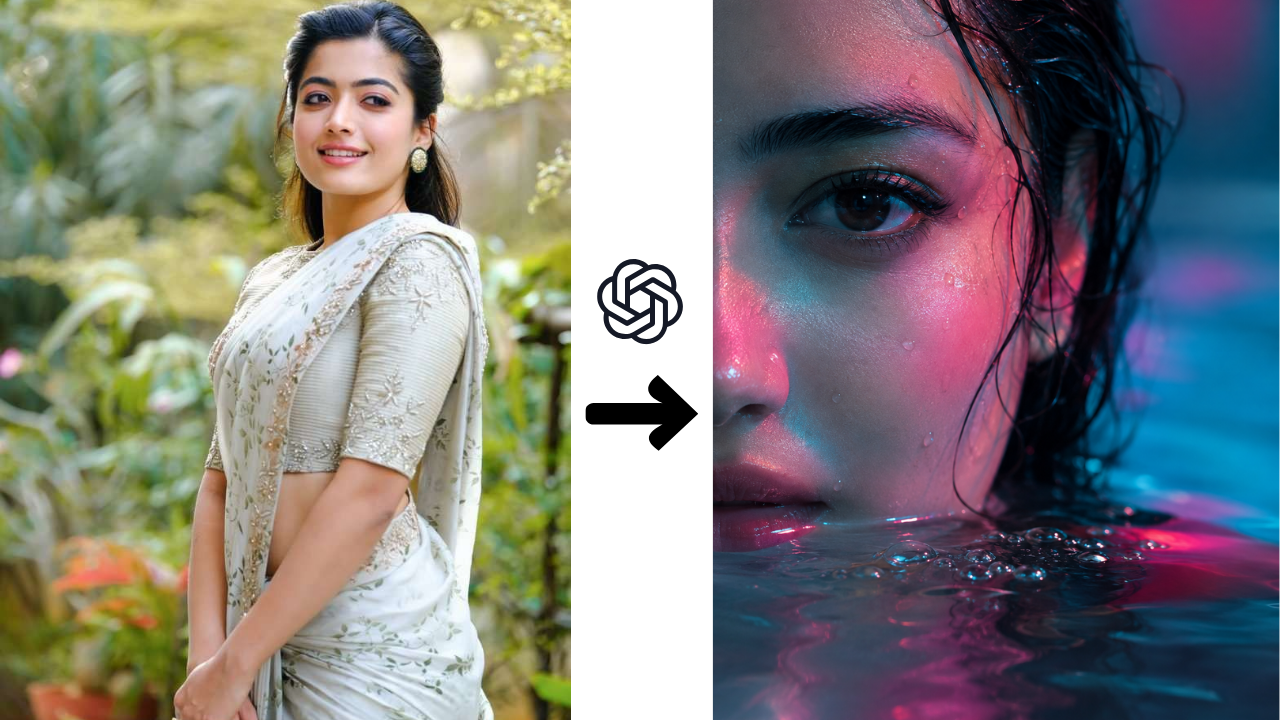
In this article, you’ll learn how images like the one shown above are created, how the prompt works, and what techniques help you achieve the most realistic AI-generated portraits.
What Is a Hyper-Realistic AI Portrait?
A Hyper-Realistic AI Portrait is an AI-generated image that looks almost identical to a professionally captured photograph. It recreates even the smallest details with incredible accuracy, including:
- Natural skin texture
- Individual hair strands
- Water droplets
- Eye reflections
- Professional lighting
- Shallow depth of field
- Realistic facial details
These portraits are widely used for social media profiles, digital artwork, posters, YouTube thumbnails, wallpapers, and creative branding.
Key Features of This Cinematic Portrait
The image above uses several professional cinematic elements that make it look like a movie scene.
- Only the left half of the face is visible.
- The face is partially submerged in water.
- Realistic water droplets and tiny bubbles appear on the skin.
- Beautiful blue and pink neon lighting creates a dramatic atmosphere.
- Wet hair naturally sticks to the face.
- The eye remains in sharp focus.
- The background is completely blurred with a bokeh effect.
- Ultra-detailed skin texture makes the portrait look lifelike.
These elements combine to create a premium cinematic appearance.
How Does AI Create This Portrait?
The AI first analyzes the facial features in the original photograph.
Then, based on the prompt, it performs several enhancements:
- Changes the camera angle.
- Crops the image into a dramatic close-up.
- Adds realistic water effects.
- Creates colorful neon lighting.
- Generates reflections on wet skin.
- Blurs the background for a cinematic look.
- Keeps the eyes as the sharpest focal point.
- Enhances skin texture with realistic pores and fine details.
The AI attempts to make every light reflection, texture, and shadow appear as natural as possible.
Prompt Used
Generate a hyper 100% realistic close-up portrait of a young woman’s face, with only the left half visible and partially submerged in water. The scene is dramatically lit with soft ambient blue and pink neon lighting, casting colorful reflections across her wet skin and damp hair. Water droplets and tiny bubbles cling naturally to her face, enhancing the cinematic atmosphere. Ultra-detailed skin texture, realistic pores, lifelike eyelashes, sharp eye focus, shallow depth of field, professional photography, HDR, 8K, photorealistic, masterpiece, ultra realistic, high detail, soft cinematic lighting.
Prompt Breakdown
1. Hyper Realistic
This tells the AI to create an image that looks like a real photograph rather than digital artwork.
2. Close-Up Portrait
This instruction ensures that the AI focuses entirely on the face instead of the full body or surrounding environment.
3. Left Half Visible
Showing only half of the face creates a dramatic and artistic composition that immediately captures attention.
4. Partially Submerged in Water
This adds reflections, depth, and mood while creating a premium cinematic effect.
5. Blue & Pink Neon Lighting
Neon lighting gives the portrait a modern cinematic style and produces colorful reflections across the skin.
6. Water Droplets
Tiny water droplets make the skin appear more realistic and visually appealing.
7. Sharp Eye Focus
In portrait photography, the eyes are the most important subject. Specifying “sharp eye focus” ensures the AI prioritizes facial expression and realism.
8. Ultra-Detailed Skin Texture
This instruction helps generate realistic pores, natural skin imperfections, and lifelike facial details.
9. HDR & 8K
These keywords encourage the AI to generate a higher-quality image with enhanced lighting, color, and overall detail.
Tips for Better Results
To achieve the best possible AI portrait, follow these recommendations:
- Use a high-resolution original photo.
- Make sure the face is clearly visible.
- Choose an image with good natural lighting.
- Mention the desired camera angle.
- Clearly specify the lighting colors.
- Include the mood, such as cinematic, dramatic, or soft.
- Mention realistic skin texture and sharp eye focus.
- Add keywords like HDR, 8K, Ultra Detailed, Photorealistic, and Masterpiece.
AI Tools That Support This Prompt
This prompt works well on many popular AI image generation platforms, including:
- ChatGPT (GPT Image)
- Midjourney
- FLUX
- Stable Diffusion
- Ideogram
- Leonardo AI
- Google Imagen (where available)
Final Thoughts
If you have a high-quality portrait photo and want to give it a professional cinematic look, the prompt plays the most important role. Elements such as water effects, neon lighting, close-up composition, and ultra-detailed skin textures help AI generate incredibly realistic and visually stunning results.
With the right prompt, you can create portraits in just a few minutes that look like they came from a professional fashion photoshoot or a Hollywood movie poster.

