AI Holi Special 3D Photos
Create Stunning AI Holi Special 3D Photos with Just One Click – Face Match & Cinematic Quality
Are you looking for a unique and eye-catching profile picture for this Holi? Instead of using the same old photos, why not create a cinematic AI-generated Holi portrait that looks like it came straight out of a Bollywood movie? Thanks to modern Artificial Intelligence (AI), transforming your regular selfie into a colorful, ultra-realistic Holi masterpiece is now easier than ever.
With today’s advanced AI image generators, you only need a clear reference photo and a well-written prompt. Within seconds, AI can generate a high-quality portrait that keeps your original facial features while adding realistic Holi colors, dramatic lighting, and a festive atmosphere. Whether you want to update your Instagram profile, Facebook cover photo, WhatsApp DP, or simply create something fun to share with friends, this method delivers amazing results.
🎨 Copy and Use This AI Holi Prompt
Upload your clear front-facing photo to your favorite AI image generator and paste the following prompt:
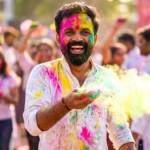
A high-quality, realistic portrait of a young Indian man celebrating Holi. He is wearing a white cotton kurta, completely drenched in vibrant colors like pink, yellow, and green. He has a big joyful smile, throwing organic gulal powder into the air. The background is a sunny outdoor festive setting with soft bokeh. 8K resolution, cinematic lighting. Use 100% face from reference photo.
This prompt is designed to produce a realistic Holi portrait while preserving your original face. If you’re creating an image for a woman, simply replace “young Indian man” with “young Indian woman.”
✨ Why This Prompt Works So Well
One of the biggest challenges with AI image generation is maintaining the person’s real identity. This prompt specifically instructs the AI to preserve your facial structure while enhancing the overall scene with realistic Holi elements.
✅ Accurate Face Match
The phrase “Use 100% face from reference photo” encourages the AI to retain your original facial features as closely as possible. While the exact result depends on the AI tool you’re using, it significantly improves face consistency.
🌈 Vibrant Holi Colors
The combination of pink, yellow, and green gulal creates a lively and festive look. These colors appear naturally on the face, clothes, and in the air, making the portrait feel energetic and authentic.
🎥 Cinematic Lighting
Professional-looking cinematic lighting adds depth, highlights facial expressions, and gives the image a premium movie-like appearance instead of looking like a typical AI-generated picture.
📷 Beautiful Bokeh Background
A softly blurred festive background keeps the focus on your face while adding a realistic outdoor Holi celebration atmosphere.
🖼️ Ultra HD 8K Quality
The prompt requests an 8K-resolution image, allowing AI tools that support high-resolution generation to create crisp, detailed portraits suitable for social media posts, wallpapers, and even printing.
📸 How to Create Your AI Holi Photo (Step-by-Step)
Creating your own AI Holi portrait is incredibly simple.
Step 1: Open any AI image generator that supports Image-to-Image or Reference Image generation.
Step 2: Upload a clear, high-quality front-facing photo with good lighting.
Step 3: Copy and paste the Holi prompt into the prompt box.
Step 4: If available, increase the image quality or realism settings for even better output.
Step 5: Click the Generate button and wait a few seconds while the AI creates your personalized Holi portrait.
💡 Tips for Better Results
- Use a high-resolution reference photo.
- Make sure your face is clearly visible.
- Avoid sunglasses, masks, or heavy shadows.
- Choose a photo with a neutral expression if you want the AI to create natural smiles.
- Experiment with different AI models to achieve various artistic styles.
🎉 Perfect for Social Media
Your AI-generated Holi portrait is perfect for:
- Instagram Profile Picture
- Facebook Cover Photo
- WhatsApp DP
- X (Twitter) Profile
- YouTube Thumbnail
- Festival Greeting Cards
- Wallpapers
- Personalized Holi Wishes
Final Thoughts
AI image generation has completely changed the way we create personalized festival photos. With just one clear reference image and the right prompt, you can generate a stunning cinematic Holi portrait that looks professional, colorful, and incredibly realistic. The best part is that you don’t need any editing skills or expensive software—everything is done automatically by AI within seconds.
So, if you’re ready to impress your friends and followers this Holi, copy the prompt above, upload your photo, and let AI transform your ordinary selfie into an extraordinary Holi masterpiece filled with vibrant colors and cinematic beauty.